01✦
Ask about your code
Run a program and get a plain-language explanation grounded in the code and error you can already see.
Why did I get a NameError?→
OPEN-SOURCE PYTHON IDELOCAL-FIRST AI
A familiar Thonny experience with a local, open-source AI assistant that explains code, suggests fixes, and helps you learn without taking over.
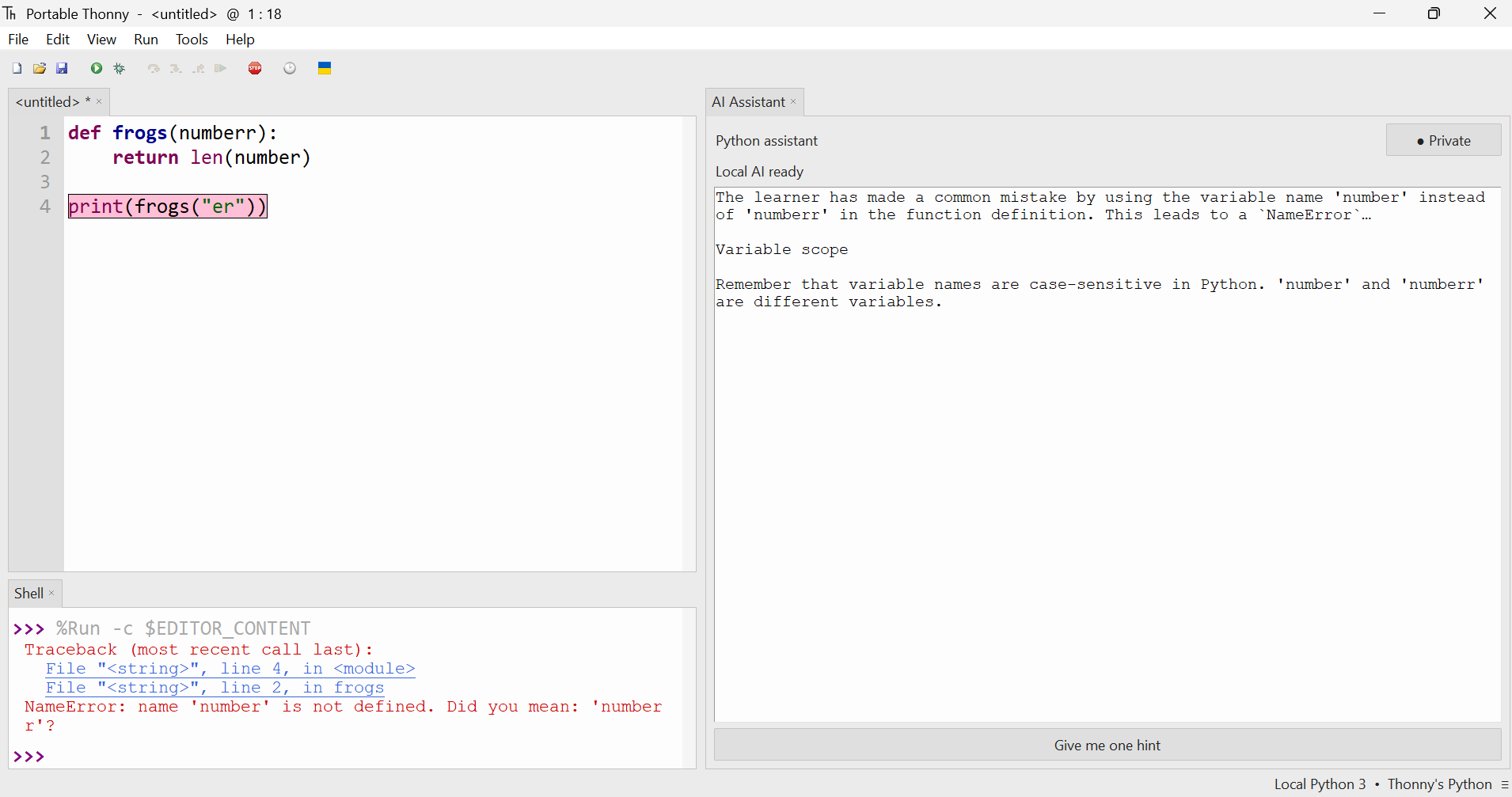 01 · Python editor02 · Local AI guidance
Your code stays on your machine.
Guidance that teaches, not shortcuts.
Built in the open, ready to extend.
WHY THONNY-PLUS
AI assistance should make the next idea clearer—not make the learner disappear from the loop.
Run a program and get a plain-language explanation grounded in the code and error you can already see.
Ask for a nudge instead of a finished answer. The learner stays in charge of the next edit.
numbernumberrThe assistant runs with a supported open model on the learner’s computer—private by design.
LEARNER WORKFLOW
Thonny-Plus keeps assistance close to the editor and shell. No tab switching, no copied error messages, and no loss of context.
Thonny displays the traceback and highlights the relevant line using its familiar beginner-friendly tools.
The assistant connects the traceback to the learner’s code and explains the underlying Python concept.
The learner gets a focused next step, edits the code, and runs it again—keeping the feedback loop intact.
IMPLEMENTATION
The assistant is added as a focused side panel. It reads the active editor context and latest runtime error, sends only the necessary prompt to a local model, and returns learning-first guidance.
The active Python source, selected line, and latest traceback form the working context.
source + tracebackA learner-first instruction asks for explanation, concept, and one useful hint—not a full solution.
explain → teach → hintAn open-source model runs on the machine and produces a response without uploading the project.
localhost / modelThe result appears beside the code with privacy status and an action for the next hint.
explanation + next stepSYSTEM REQUIREMENTS
The local AI model needs more resources than standard Thonny. These baseline requirements keep the editor and assistant responsive together.
GET THONNY-PLUS
Install the current Windows 64-bit classroom build directly, or browse the source and releases on GitHub.
OPEN BY DEFAULT
Thonny-Plus builds on the spirit of Thonny: small, welcoming, and transparent. The assistant is designed around replaceable open models, clear prompts, and community-shaped learning.
1 capture editor + traceback
2 build learner-first prompt
3 run open model locally
4 render explanation + hint

✓ IDE ready
✓ Local AI connected
✓ Source remains private
READY WHEN YOU ARE